Recording payments and closing out your daily cash settlement
Last updated: 2026-08-30
Checking that the cash in your drawer matches what it's supposed to be at the end of the day is usually called a "cash-up". Doing it by hand with a calculator and a notepad works, but it's easy to make a mistake and hard to track down where the gap came from. Biseo does the maths for you and compares it against what you actually count.
1. Record the payment method when completing a booking
When you mark a booking as "completed", a payment entry screen appears where you pick how much, and by what method (cash, card, bank transfer, etc.). If one customer paid two ways (say, A$50 by card and A$20 in cash), you enter each separately. If your shop uses a payment method that isn't in the default list, add it yourself under Settings > Payments.
2. Close out the day under "Daily Settlement" in the sidebar
Go to Sidebar > Daily Settlement and you'll see a history list of every date you've closed out so far. To start today's settlement, click "Today's settlement" in the top right; to revisit a past date, click "View" next to it in the list.
- Expected cash is calculated for you: opening float this morning + cash sales collected today − cash refunds + money you added mid-day (pay-in) − money you took out mid-day (pay-out) = expected cash. No calculator needed — it's already on screen.
- Log petty cash as it happens: say you paid a delivery person for supplies straight out of the drawer — log that as a pay-out right then. Skip it, and you'll be left wondering later why the drawer's short.
- Close-out: enter the "actual count" from physically counting the notes and coins, and the screen instantly compares it to the expected amount — showing whether you're spot on, over, or short (in red). Split the actual count into what you're banking and what carries over as tomorrow's float, then click "Close" to lock it in.
A full walkthrough example
Say you run a nail salon.
- Morning: you put A$200 in the drawer as change (opening float).
- During the day: cash payments from customers add up to A$2,725 (card and bank transfer never touch the drawer, so they don't factor in here).
- Mid-afternoon: you run out of a nail product and grab A$45 cash from the drawer to buy more → log it as a "pay-out of A$45".
- Later that afternoon: you're short on coins, so you top up the drawer with A$30 from your own wallet → log it as a "pay-in of A$30".
- At close: open Daily Settlement and the expected cash is already calculated:
Expected cash = A$200 (opening float)
              + A$2,725 (today's cash sales)
              + A$30 (pay-in)
              − A$45 (pay-out)
              = A$2,910
- You count the drawer and it comes to A$2,895. The screen shows "Difference: A$15 short" in red. You note "probably gave a customer the wrong change" in the note field, split the banking amount and tomorrow's float, and close it out.
No calculator required to figure out what the drawer should have, and any gap between that and what's actually there shows up immediately.
3. Checking your card (EFTPOS) takings too
This is for you if: your dashboard shows today's revenue as A$570, but the Daily Settlement screen's "Banked amount" only shows A$40. The other A$530 hasn't gone missing — it's what customers paid by card. Card takings never touch the physical cash drawer, so they were never part of the "expected cash" maths — but until now there was nowhere on screen to actually see that card total, which is exactly the confusing part.
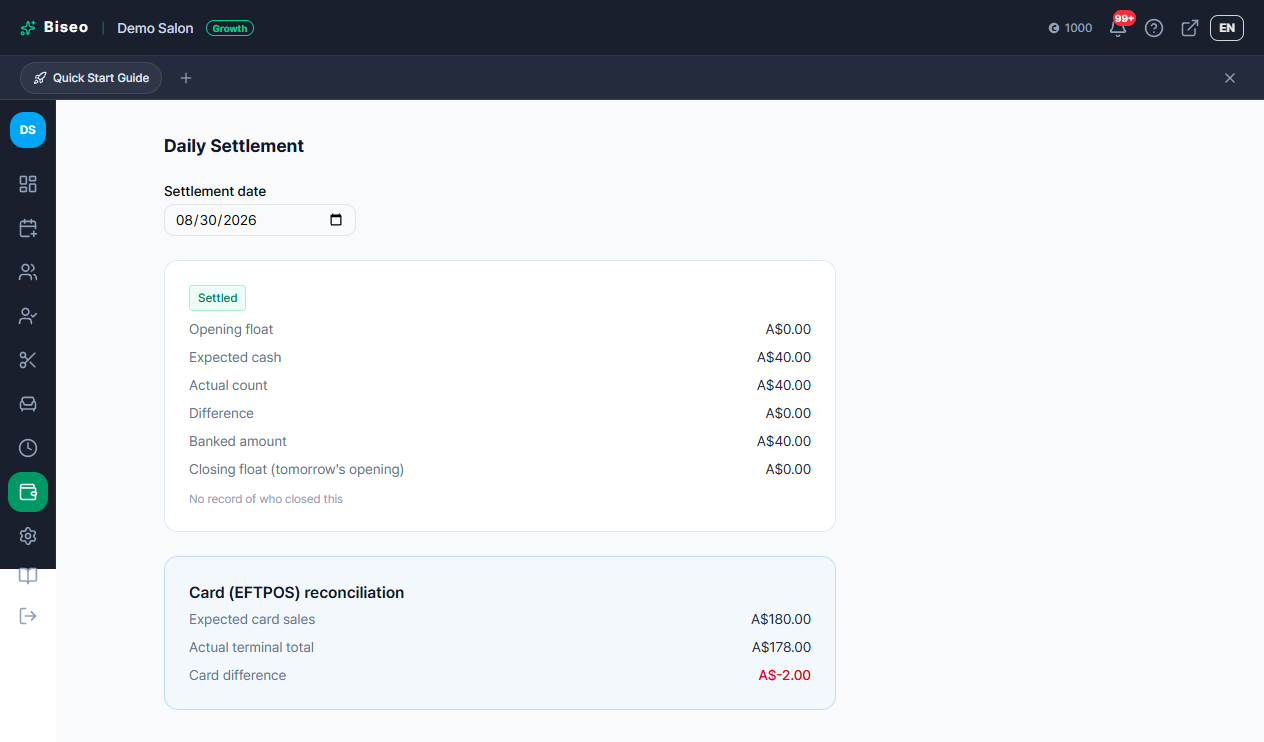
The Daily Settlement screen has a separate "Card (EFTPOS) reconciliation" section (visually set apart from the cash section):
- Expected card sales: the total of everything recorded as "card" for bookings completed that day, calculated automatically — always visible, no input needed.
- Actual terminal total (optional): enter the total from your card terminal's own end-of-day receipt, and the screen compares it against the system total and shows the difference. This catches mismatches from delayed offline approvals, a missed tip, or a terminal error.
- This field is optional — if you don't use a card terminal, or don't need to reconcile it, you can leave it blank and still close out the day.
Note: Stripe deposits (online prepayment) aren't part of this card reconciliation — Biseo already knows that amount directly from Stripe's own notification, so there's nothing to check it against. Reconciliation only applies to money taken through the salon's own card terminal.
Once you close out the day, the card reconciliation result shows up right alongside the cash summary:
4. Browsing settlement history, printing/saving as PDF, and CSV export
Here's what you can do from the history list under Daily Settlement:
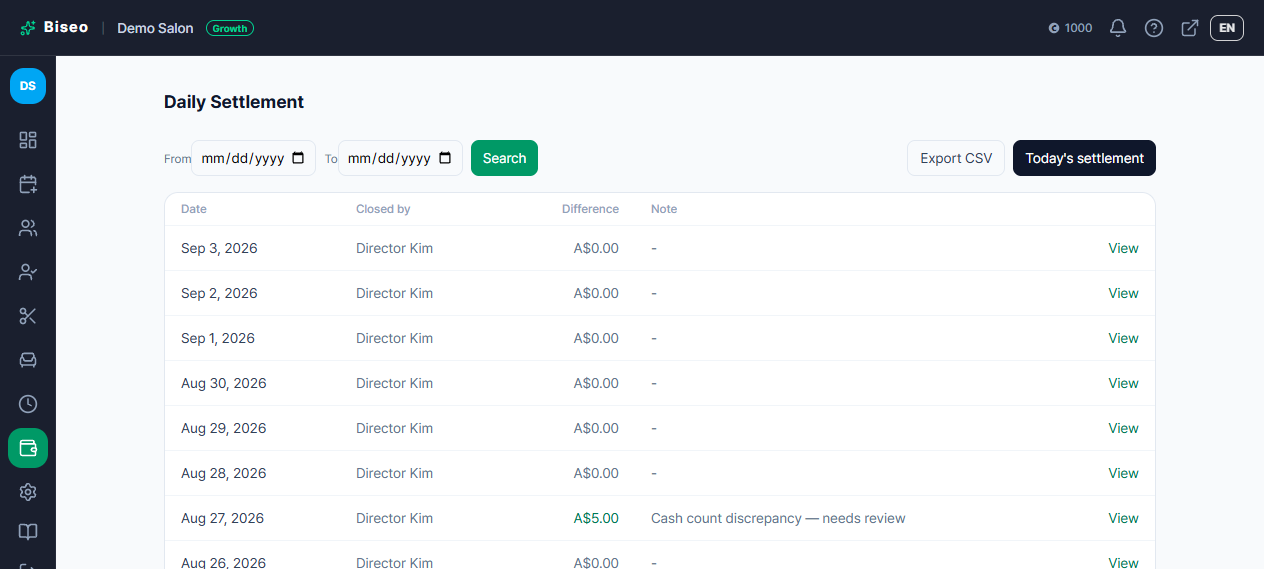
- Search by date range: enter a from/to date to narrow the list to a specific period.
- Print / Save as PDF: on a closed date's detail screen, click "Print / Save as PDF" to get a print-ready report with your business name, address and phone in a letterhead, laid out alongside that day's cash and card reconciliation figures. Print it directly or use your browser's "Save as PDF" to hand it to a bookkeeper or keep it for your own records.
- Export CSV: pick a date range from the list and click the CSV button to download every settlement record in that range (opening float, expected/actual cash, difference, banked amount, carried-over float, card reconciliation, etc.) as a single file — opens straight in Excel or Google Sheets.
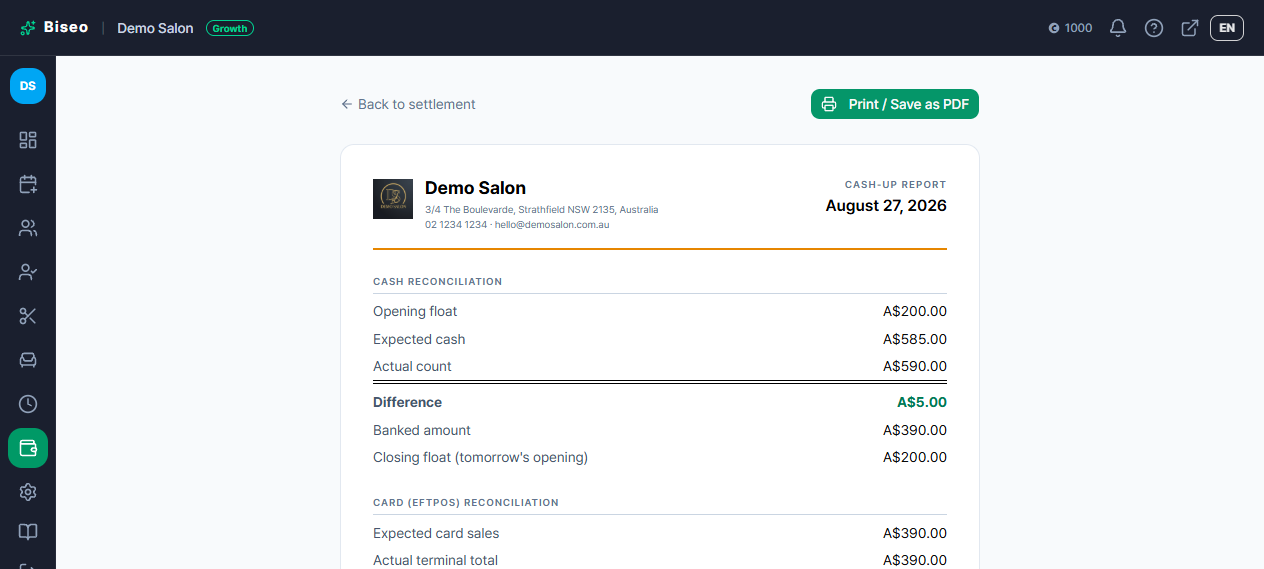
Note: this print report and CSV only cover that day's financial reconciliation (cash and card close-out figures) — sales reporting broken down by service or staff member isn't included. Let us know if you need that separately.
How this compares to other booking systems
A dedicated "expected vs. actual, with the gap flagged automatically" cash-up workflow like this isn't something every salon booking system has. Based on our research:
- Phorest, Mangomint, and Timely offer a genuinely similar close-out workflow (their own help docs: Phorest · Mangomint · Timely). Phorest's own help article specifically notes that its cash-up screen lists credit/debit card totals as separate rows right alongside cash — the same approach Biseo's card (EFTPOS) reconciliation section takes. Phorest also provides a list view of past cash-ups you can browse by date and print/export — Biseo's settlement history list, print report, and CSV export cover the same ground.
- Fresha leans on reading payment reports rather than a dedicated close-out screen — a salon owner interviewed on Fresha's own blog describes checking the sales report at the end of the day to reconcile.
- Vagaro calculates an expected drawer balance, but we couldn't confirm from their official docs a step where you enter an actual count and the gap is compared automatically.
Biseo's daily settlement is available on every plan, including Free, at no extra cost (just needs an owner or manager login) — and it factors in petty cash pay-ins/pay-outs from the start.
Once a date is closed, it can't be edited
There's no way to reopen or edit a settlement once it's been closed — a close-out is treated as a final accounting record. If you find a payment method was recorded incorrectly, it's fixed with a correction entry (a reversing entry) rather than editing the original — and that correction is reflected in the settlement for the date the correction was made, not retroactively in the original day's record.
Can't find what you're looking for? Contact us →