How client account deletion works
Last updated: 2026-09-05
Clients can delete their own account at any time from their logged-in account, whichever way they originally signed up — Google, Kakao, or an email magic link. Here's what's removed and what stays, so it's clear what you'll see in your customer list.
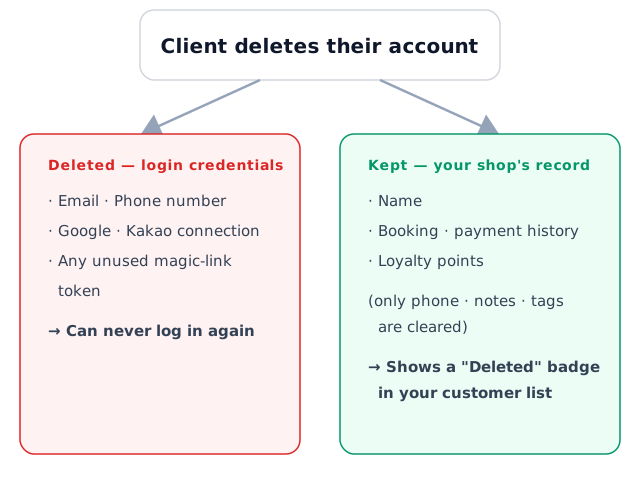
What's deleted — login credentials
- The login itself (the email/phone tied to the account)
- Google/Kakao connections
- Any unused email login link
Once deleted, that account can never log in again.
What's kept — booking, payment, and loyalty history at your shop
Deleting an account doesn't erase the booking record itself. Booking, payment, and loyalty point history all stay, and the client's name is kept too — only contactable details like phone, email, notes, and tags are cleared.
In your customer list, a "Deleted" badge appears next to the name so you can tell at a glance.
Example: a regular who's booked with you for 6 months deletes their account — their 13 past bookings, payment history, and loyalty points all stay in the customer list. Only the phone field is now empty, with a "Deleted" badge next to their name.
Deletion isn't blocked by upcoming bookings
If the client has an upcoming booking at the time of deletion, it isn't automatically cancelled. The booking stays as-is, so review and handle it yourself if needed.
Signing up again doesn't reconnect to the old history
If a deleted client signs up again with the same email or phone number, they're treated as a brand new client — their old history and points at your shop don't come back automatically. This is explained to the client on the confirmation screen before they delete their account.
Can't find what you're looking for? Contact us →