Should your salon charge more at peak hours? How booking platforms handle time-based pricing
Friday evening and Saturday morning fill up within hours of opening. Tuesday and Wednesday mornings sit half-empty most weeks. Airlines and hotels solved this decades ago with time-based pricing — charge more when demand is high, less when it isn't. A growing number of salon booking platforms now offer some version of the same idea.
The strings attached elsewhere
We looked at what's actually documented in each platform's own help centre rather than their marketing copy — and where the feature exists, it usually comes with a condition.
- Salonized's "Dynamic Pricing" only adjusts by percentage. If you want "A$10 more in this window" as a clean round figure, there's no way to set it — every service ends up with an awkward trailing amount instead (Salonized Help Centre).
- Fresha's "Smart Pricing" is reported to cap how many windows you can set in a single day. If your morning, midday and evening rates all differ, that ceiling is the first thing you have to work around (Fresha Help Centre).
- Zenoti's "Demand Pricing" isn't something you set on the service directly — you build a "demand price group" first, then assign it. That structure suits a multi-location enterprise spa; for an owner adjusting their own rates it's an extra step every time (Zenoti Help Centre).
💡NotePhorest's "Prime Pricing" isn't a software feature — it's a manual pricing strategy (described on Phorest's own blog), where the owner raises prices by hand for specific days or staff and communicates the change directly to clients and team — worth flagging since the name reads like an automated feature.
In Biseo there are no strings
You pick the days and the window (say, Friday and Saturday 3pm–7pm), attach it to one service or your whole menu, enter the adjustment, and you're done. No intermediate group to build first, no ceiling to plan around.
- Percentage or flat amount — set it as "+15%" or as "+A$10". If awkward trailing figures bother you, use the flat amount and land on a round number.
- No cap on rules — if your morning, midday and evening rates all differ, add all three. There's no limit on how many windows a day can hold.
- One screen, one save — service, days, window and adjustment all go in together. If a new rule overlaps an existing one for the same service, it's rejected at save time, so it's never ambiguous which rule applies.
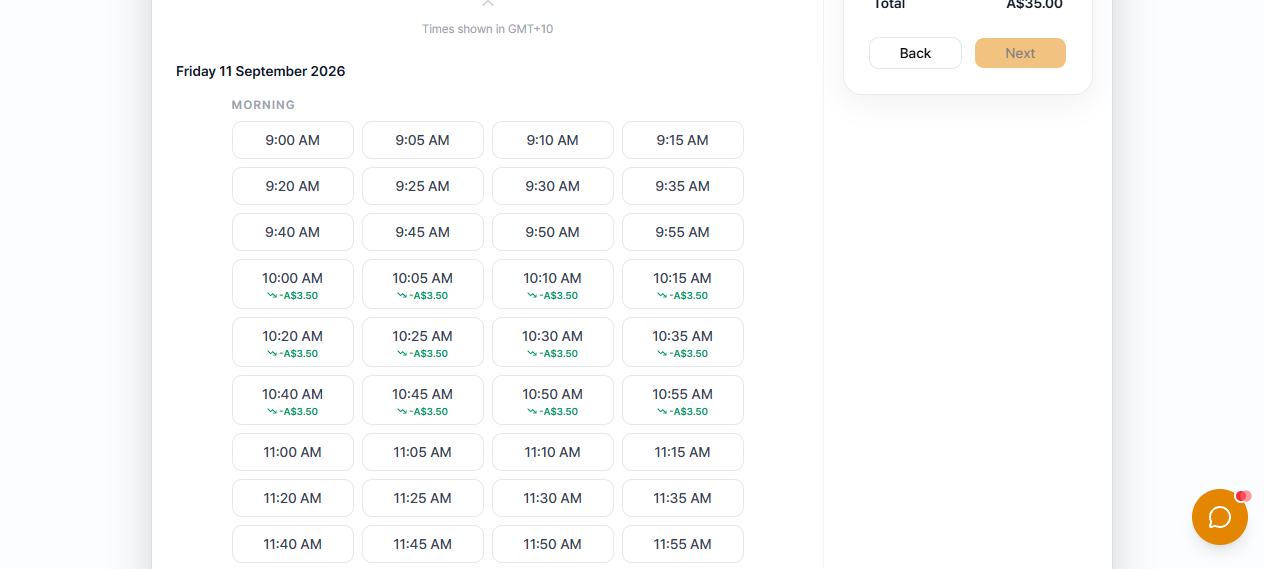
- Customers see it first — a badge on the time-slot picker, then the adjusted total on the confirmation screen with the original price struck through. The price never changes on them at checkout, and a customer booking through the AI chatbot is quoted the same figure.
Example: a salon running near capacity every Friday evening adds a +15% rule for Friday 3pm–7pm across its whole menu. A quieter salon instead adds a -10% rule for Tuesday and Wednesday mornings to pull bookings into its slowest window.
Is it worth turning on?
If your calendar already fills up predictably at certain hours regardless of price, a surcharge captures value you're currently leaving on the table. If certain hours sit consistently empty, a discount is one lever — alongside marketing and staffing — to fill them. Neither replaces the other; most salons that use this well run both at once, on different windows.
Start your free trial and set up your first pricing rule from the booking page settings.