Daily cash settlement — finding out why the drawer doesn't add up
Fewer shops than you'd think open the drawer at the end of the day and find it matches exactly. Usually it's something small — a few dollars taken out for supplies and never logged, or change added in without a note. The small stuff is easy to miss unless you've already worked out what the drawer should have in it.
Expected cash vs. actual count
The core of daily settlement is simple: work out how much cash should be in the drawer today (expected cash), then compare it against what you actually count.
Expected cash = opening float + today's total cash sales + petty cash pay-ins − petty cash pay-outs
It's easy to leave the petty cash movements out of that equation. An owner grabbing a few dollars from the drawer for supplies, or topping it up with change from elsewhere, happens all the time in a real shop — but without logging it separately, you're left tracing back "why doesn't this add up?" from scratch at close.
Where platforms diverge
The first thing that splits them is whether the software works out the expected figure for you at all.
Fresha leans on report-based reconciliation without a dedicated close-out workflow — even a salon interview featured on Fresha's own blog describes checking a sales report at the end of the day rather than using a built-in expected-vs-actual screen. If you open the drawer every night, that gap comes back as manual work every single night.
A close-out feature does exist at Phorest (Cash Up) and Mangomint (Add a New Count). But having the feature and being able to lean on it every day are different things — what actually separates them is whether card takings are reconciled on the same screen, whether you can hand a past month to a bookkeeper as-is, and whether a closed day can quietly be edited later. Those three are the rest of this article.
💡NoteThese citations reflect each platform's official support documentation as we reviewed it — support docs change over time. Confirm current details directly with the platform before making a decision based on this.
How Biseo's daily settlement works
Biseo works out the expected cash for you, and entering your actual count shows the difference right away.
- Recording the payment method (cash, card, etc.) when you complete a booking rolls up automatically into the day's total cash sales.
- Petty cash movements — supply purchases, topping up change — feed straight into the expected cash calculation as you log them.
- At close-out, entering your actual count shows the difference against the expected amount immediately, and you can split the amount banked from the float carried over to the next day.
Once a date is closed, there's no way to reopen or edit it — it's treated as a final accounting record. If a payment method was recorded incorrectly, it's fixed with a correction entry rather than editing the original.
"Revenue went up, so why didn't settlement move?" — why card takings need their own view too
Settlement focusing on "expected cash vs. actual count" is a deliberate design choice — money paid by card never touches the drawer in the first place. But that design has a blind spot: if there's nowhere to see the card total itself, an owner can end up confused seeing revenue of A$570 on the dashboard while settlement only shows A$40. The other A$530 didn't go anywhere — it's just what came in by card, with no screen anywhere showing it.
So Biseo gives card takings their own "Card (EFTPOS) reconciliation" section on the Daily Settlement screen — visually separated from the cash section, with that day's expected card total always shown automatically. You can optionally enter your card terminal's own end-of-day receipt total to reconcile the difference too, or skip it and still close out the day. Online deposits collected via Stripe aren't part of this reconciliation, since Biseo already knows that amount directly.
A close-out screen that shows you nothing but cash is only reconciling half the day for any shop where most takings arrive by card.
Your past records matter too — history list, print/PDF, and CSV export
A daily settlement habit is only half useful if there's no way to look back at past records or hand them to a bookkeeper. If "can you send me last March?" means screenshotting one day at a time, the feature isn't really there.
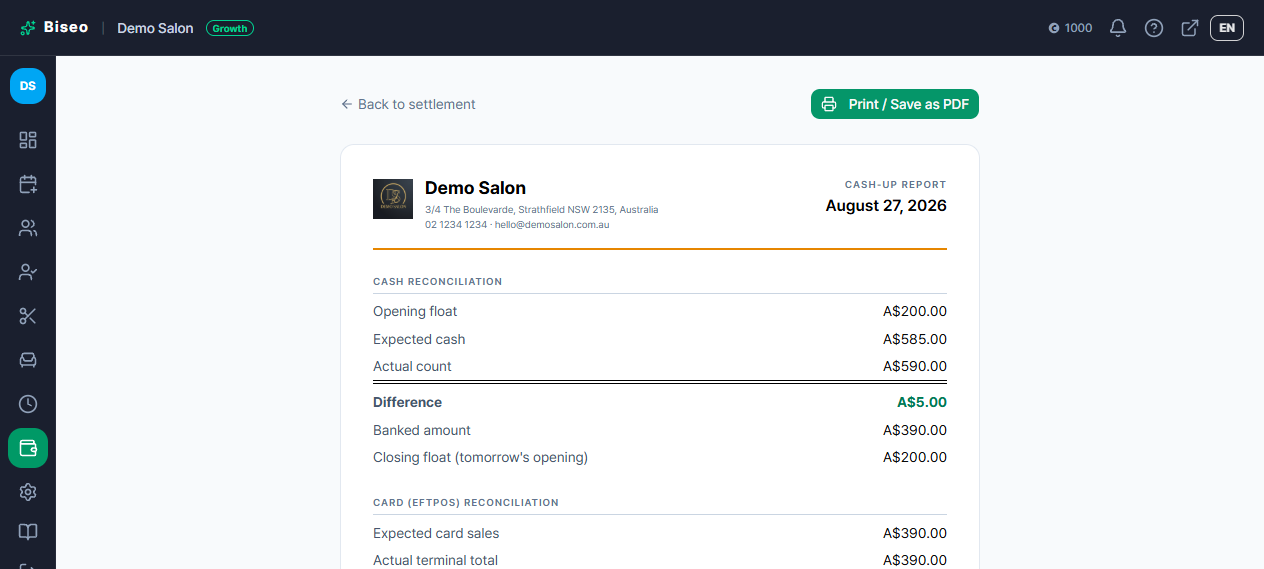
Biseo's Daily Settlement opens on a history list of every date you've closed out, with a date-range search. Any closed date can be printed or saved as a PDF — a report with your business letterhead alongside that day's cash and card figures — and you can export CSV for a whole date range at once to hand off to a bookkeeper. Sales reporting broken down by service or staff member is a separate thing and isn't part of this — this stays scoped to that day's financial reconciliation.
Why this is worth checking before you pick a platform
Fresha doesn't have a dedicated expected-vs-actual workflow at all — you're reconciling from a sales report by hand. If daily cash discipline matters to your shop, that's a real gap to be aware of, not a minor detail. Biseo calculates expected cash automatically and reconciles it against your actual count, and a closed date is genuinely final — no quiet edits after the fact, only a correction entry that keeps the original on record. For a shop that's ever had a "why doesn't this add up anymore" moment months after close, that permanence is the part that matters most.
Want to see the daily settlement workflow in action? You can check it out yourself with Start free.